 Miravo
Platforms
Save platform targets, apply templates, clean up managed resources, inspect Litmus Edge exports, and audit every platform run.
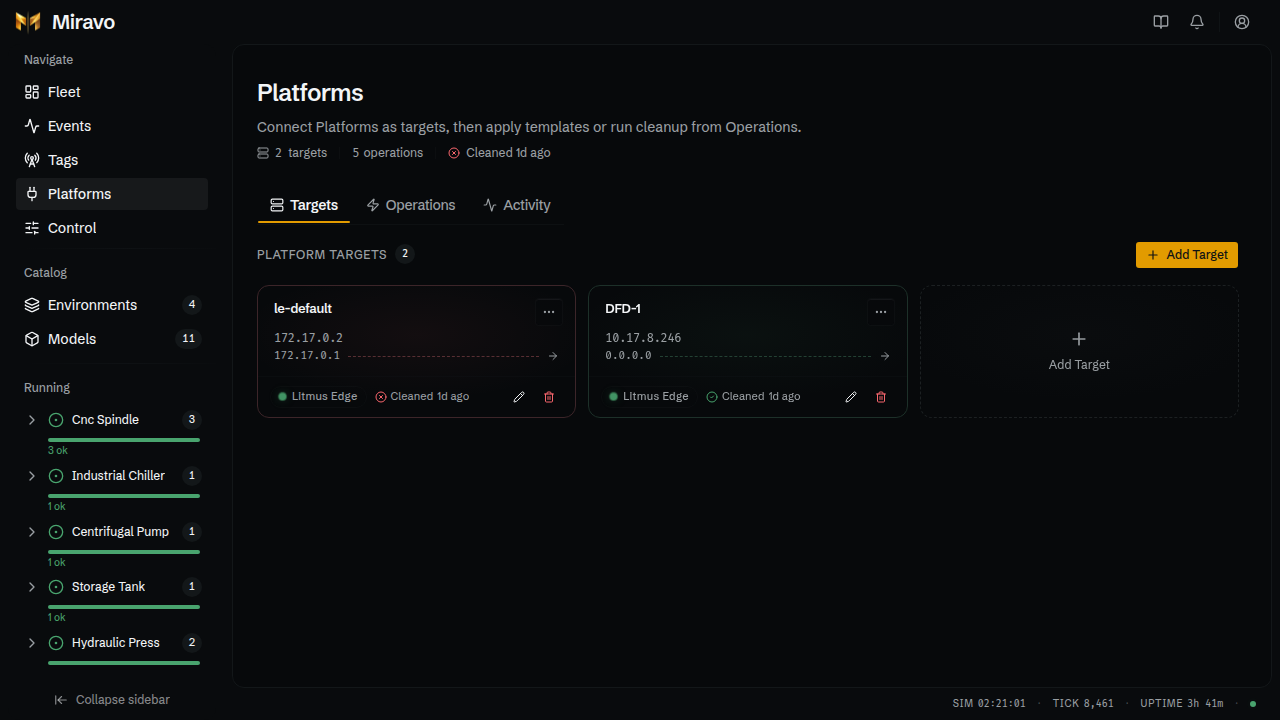
The /platforms route provisions running Miravo environments into supported platforms. Register a target once, apply or clean up from the same page, and audit every run.
Open it from the sidebar, or go to http://127.0.0.1:8080/platforms.
For the CLI equivalents, see CLI / Platforms. For the quick-start provisioning walkthrough, see Get Started / Litmus Edge.
Header
The header shows:
- Number of saved targets
- Total operation count (apply + cleanup runs)
- Outcome of the last operation
Tabs
Three tabs share one page.
Targets
The registry of saved platform instances. Each card shows:
- Label
- Platform hostname
- Source host (Miravo): the address the platform uses to reach your running environment
- Source-to-target path indicator
- Outcome of the last operation against this target
Actions: Add Target, Edit, Remove, Test connectivity.
The API token is never returned to the browser after save. Re-enter the token
from Edit to change it. This matches miravo platforms target update --api-token.
Litmus Edge is the only selectable platform today.
Saved targets are interchangeable with the CLI. Anything saved here is available to miravo apply le --target <label> and miravo cleanup le --target <label>, and vice versa.
Operations
A unified apply and cleanup panel. A mode toggle switches between Apply and Cleanup.
Apply mode:
Optional: tick Dry run only and click Preview changes for a plan table. Nothing is written to the platform.
Click Review deploy to open the confirmation dialog. Configure scopes if needed (devices / models / instances).
Click Apply to execute. A floating stream panel shows live progress by phase.
Cleanup mode:
Pick a target and a template. Optionally tick Remove all Miravo managed resources to ignore template scope.
Click Review cleanup. Tick Dry run only and Preview changes for a plan table before removing resources.
Unmanaged resources are never touched
Cleanup operates on resources tagged as Miravo-managed by a prior apply. Pre-existing Litmus Edge content is left alone.
Activity
A persisted audit trail of every apply and cleanup run, stored at ~/.miravo/platforms/operations.jsonl on the server.
- Entries grouped by date
- Expand any row for the run context: scope, filters, duration, outcome counts
- Resource breakdown by phase: DeviceHub tags, DT models, twin instances, parameter sync
- Filter by operation type, status, or target
- Search by template or target label
- Load more paginates older entries
Run outcomes you will see: success, partial (some phases failed), failed, dry_run.
Related Console surfaces
The /platforms page is the main provisioning surface, but two others are tied to it.
Tags
On /tags, Export for Platform… downloads a platform-ready tag list for the current running environment. For Litmus Edge, enter the DeviceHub device name, choose a protocol, and download the CSV. The export matches miravo export le-tags.
Catalog
On /catalog and /models, each inspect sheet has a Deploy tab.
Model inspect sheet / Deploy can download source YAML or a Litmus Edge Digital Twins model JSON. The platform JSON matches miravo export le-dt --model <name>.
When Deploy targets a running instance, Miravo uses live protocol addresses and paths. If the selected protocol does not expose that instance, apply fails and suggests spawning a new instance for that protocol, then applying it with that protocol.
Template inspect sheet / Deploy can download source YAML or a Litmus Edge template JSON ({id}.le-template.json) containing DeviceHub devices, Digital Twins models, and instance wiring. The platform JSON matches miravo export le-template -t <id> and uses the template's protocol defaults unless a protocol is explicitly overridden.
Template platform export does not need a running environment. Model Digital Twins export needs a live manifest, because members are pulled from the current runtime.
See also
Get Started: Litmus Edge
Quick start, Digital Factory Demo, and one-command provisioning.
CLI: Litmus Edge reference
Every CLI command for Litmus Edge integration.
Console overview
Fleet, Events, Alerts, Tags, Catalog, Control.
Was this page useful?
Last updated on